Human Input
Help Topics
Human Input
Help Pages
Account Settings
When you click the "Settings" button in the top nav you should be presented with the following popup showing you your account details:
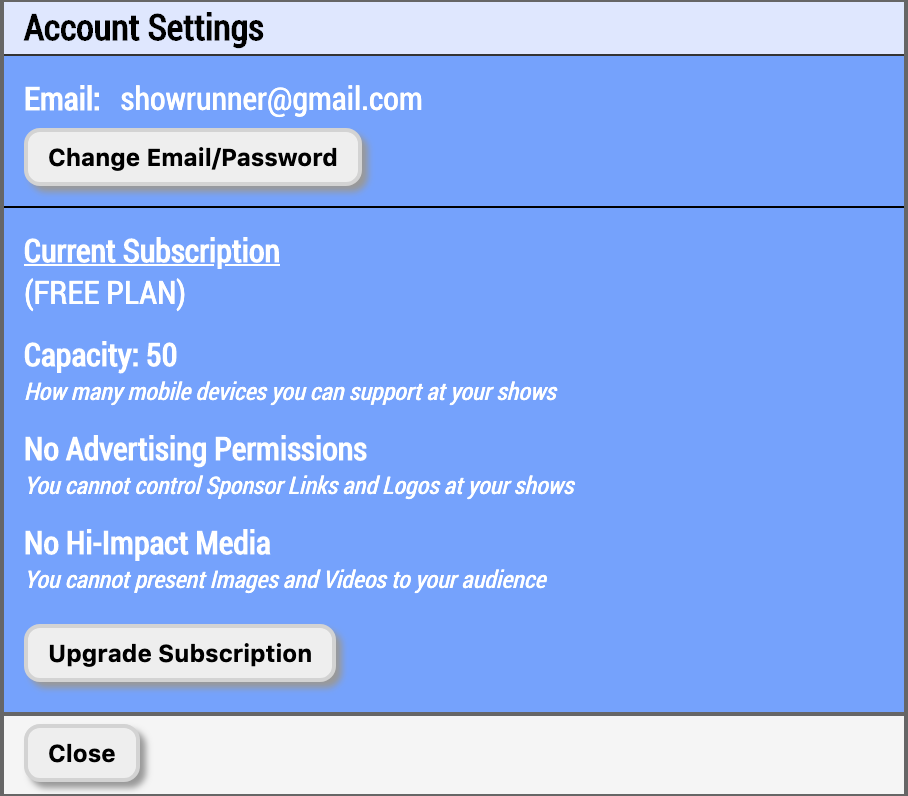
Image 5.1.1 - Account Settings - Settings Popup
Subscription Information
Your subscription information is presented on this page underneath your email. It should indicate not only what permissions you currently have available on all your shows, but also when your next billing date is. Here is a breakdown of each permission and what it represents.
- Capacity - This represents the number of mobile devices that are capable of connecting to your shows. Each time a unique audience member logs into one of your shows they are tracked and once your capacity is reached no more people will be able to get in. Anyone that has previously logged in will still be able to log out and log back in without it counting against your capacity. If your capacity is reached you can always boost the individual show and it will be instantly ready to support more audience members once the transaction is complete.
- Control Advertising? - This allows you to define Sponsor Logo and Sponsor URL values on both your shows and your venues. Whatever Sponsor Logo you specify will appear at the bottom of the mobile device screens that are logged into your shows. When an audience member clicks on the logo they will be taken to whatever link you have specified as the Sponsor URL. If you have not defined a Sponsor URL then nothing will happen when the Sponsor Logo is clicked. If you define Sponsor Logo and/or Sponsor URL values for a venue that is associated with a show the venue's Sponsor Logo and Sponsor URL will override anything set for those values on the show.
- Hi-Impact Media? - This allows you to present images and videos to your audience. Without this permission you will only be able to add "Single" and "Dual" type custom messages. Once this permission is purchased you will be able to add the "Image" and "Video" types as well. Images will appear on both the mobile devices and the TVs. Videos will be displayed on the TVs, and the mobile devices will display a message telling audience members to look at the TVs.
Controls
Here are all the things you can click on for this page:
Allows you to change your email and/or password in the Human Input system
Upgrades Your Account, allowing you to increase the permissions you have
on all your shows.