Boost Show
Note: We have structured our prices such that the cost of boosting two shows in a month is equal to a monthly subscription for those same permissions. If you are planning to boost 3 or more shows a month then you are better off Upgrading your Account.
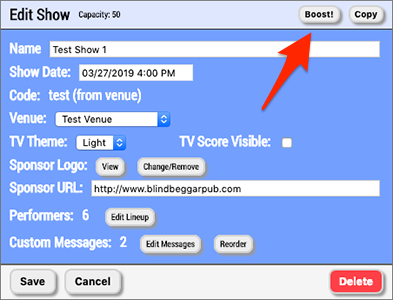
If you find that you require a higher audience capacity for your show, or you would like to add Hi-Impact Media and/or Advertising privileges, then you can click the button in the top right to add additional permissions to just this one show, as shown in the following screenshot:
After clicking the button you will be presented with the first step of the process. You will be asked what audience capacity you want this show to be capable of supporting, whether or not you want to use Hi-Impact Media, and/or you want control of the Advertising on the show, as shown in the following screenshot:
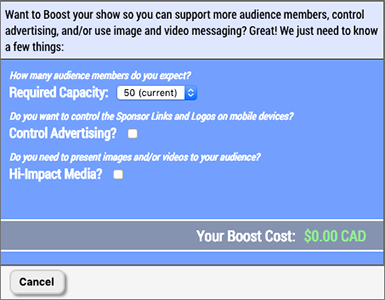
Here is a breakdown of what each permission means:
- Required Capacity - This represents the number of mobile devices that are capable of connecting to your show. Each time a unique audience member logs into your show they are tracked and once your capacity is reached no more people will be able to get in. Anyone that has previously logged in will still be able to log out and log back in without it counting against your capacity. If your capacity is reached you can always boost the show again and it will be instantly ready to support more audience members once the transaction is complete.
- Control Advertising? - This allows you to define Sponsor Logo and Sponsor URL values on both your shows and your venues. Whatever Sponsor Logo you specify will appear at the bottom of the mobile device screens that are logged into your show. When an audience member clicks on the logo they will be taken to whatever link you have specified as the Sponsor URL. If you have not defined a Sponsor URL then nothing will happen when the Sponsor Logo is clicked. If you define Sponsor Logo and/or Sponsor URL values for a venue that is associated with a show the venue's Sponsor Logo and Sponsor URL will override anything set for those values on the show.
- Hi-Impact Media? - This allows you to present images and videos to your audience. Without this permission you will only be able to add "Single" and "Dual" type custom messages. Once this permission is purchased you will be able to add the "Image" and "Video" types as well. Images will appear on both the mobile devices and the TVs. Videos will be displayed on the TVs, and the mobile devices will display a message telling audience members to look at the TVs.
As you select your desired permissions, the cost of your Show Boost will be dynamically updated at the bottom of the screen. Once you have settled on the permissions you want, click the button.
The next screen will collect your credit card information as displayed in the next screenshot:
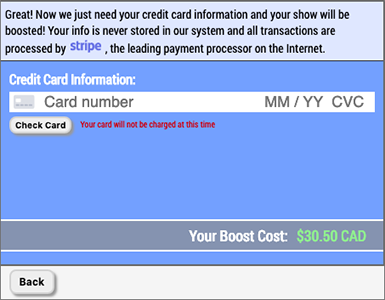
Enter in your credit card number, expiry date, CVC, and postal code. Once you are ready click the button to validate your credit card is real. Your credit card will NOT be charged at this time, nor is this a pre-authorization, it is just checking that your card is not stolen or fake. If your card is valid then you will be presented with the following screen:
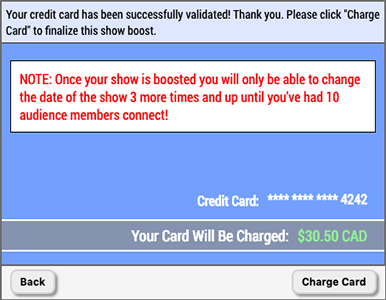
This is the final step before your Show Boost is complete. It is very important to note the message displayed which is that you can only change the date and/or time of your show 3 more times after a Show Boost is complete, or until you have 10 audience members log in, whichever comes first. This is to prevent abuse of our subscription model. Once you click the button the credit card transaction will be processed.
If all goes well with the credit card transaction then you will see the following screen detailing the new show permissions as well as how much was charged on the credit card:

Click the button to return to the Edit Show page.
Note that you now are shown a warning above the date of your show displaying the number of times you have left to change the date and/or time of your show, as shown in the following screenshot:
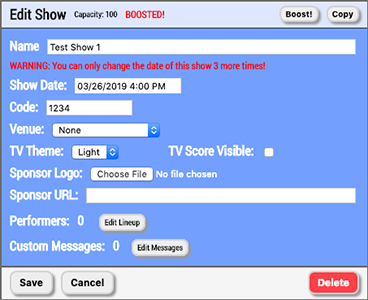
Once you have changed the date and/or time of the show 3 times after a boost, or 10 audience members have logged in, whichever comes first, the date and time of the show will be locked to prevent abuse of our subscription model, as shown in the following screenshot:
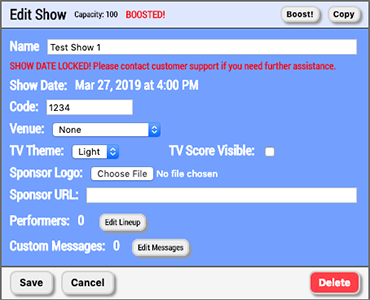
We recognize it is plausible that you need to change the date and/or time of your show more than 3 times after a boost. If you need to do so please reach out to customer service and we will be happy to help you get the show date and time right. We are reasonable people, but the automated nature of our service requires some protections from abuse. We will do our best to accommodate your needs on a manual basis, feel free to reach out anytime.