Human Input
Help Topics
Human Input
Help Pages
Show List
When you click on "Shows" in the top nav of the site, you will be presented with a list of all the shows that you've added, as shown in the following screenshot:
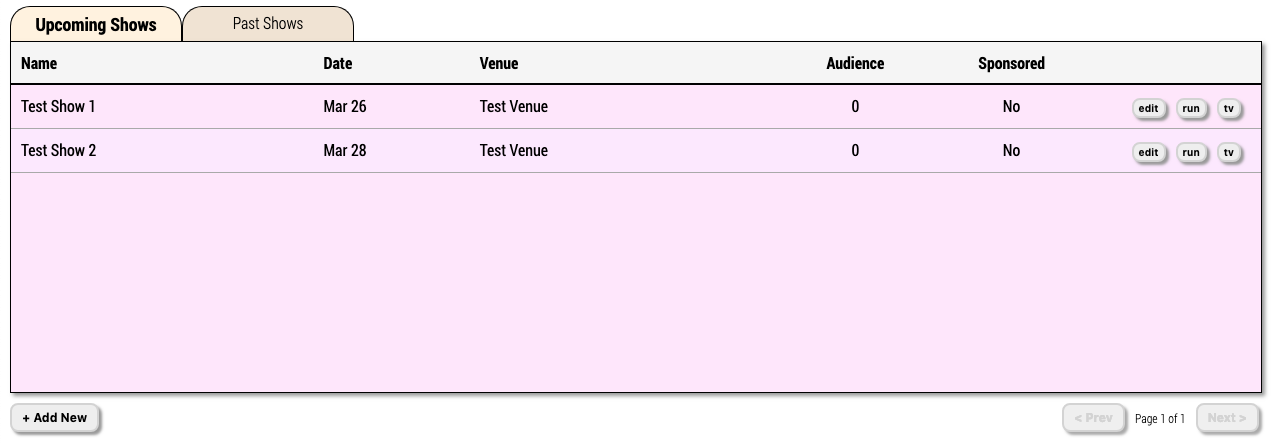
Image 2.1.1 - Show List
Tabs
- Upcoming Shows - All shows you have coming up AFTER the current date and time
- Past Shows - All the old shows you created that occur BEFORE the current date and time
Table Columns
- Name - The name you have given the show
- Date - The date you have selected for the show
- Venue - The name of the venue the show is at, if you have defined one
- Audience - The number of audience members that logged into the show
- Sponsored - Indicates whether or not a sponsor logo and URL has been defined for the show (Requires advertising permissions)
Controls
Here are all the things you can click on for this page:
Creates a new show that will appear in your show list
Edits an existing show, allowing you to change its parameters
Opens the Show Runner Interface, allowing you to change the state of your show and update TVs and Mobile Devices
Opens the TV for your show that you will want to display full screen on all the TVs in your venue
Moves you to the previous page of shows for the type you are displaying
Moves you to the next page of shows for the type you are displaying