Human Input
Help Topics
Human Input
Help Pages
Add Venue
After clicking the button you will be presented with the following popup:
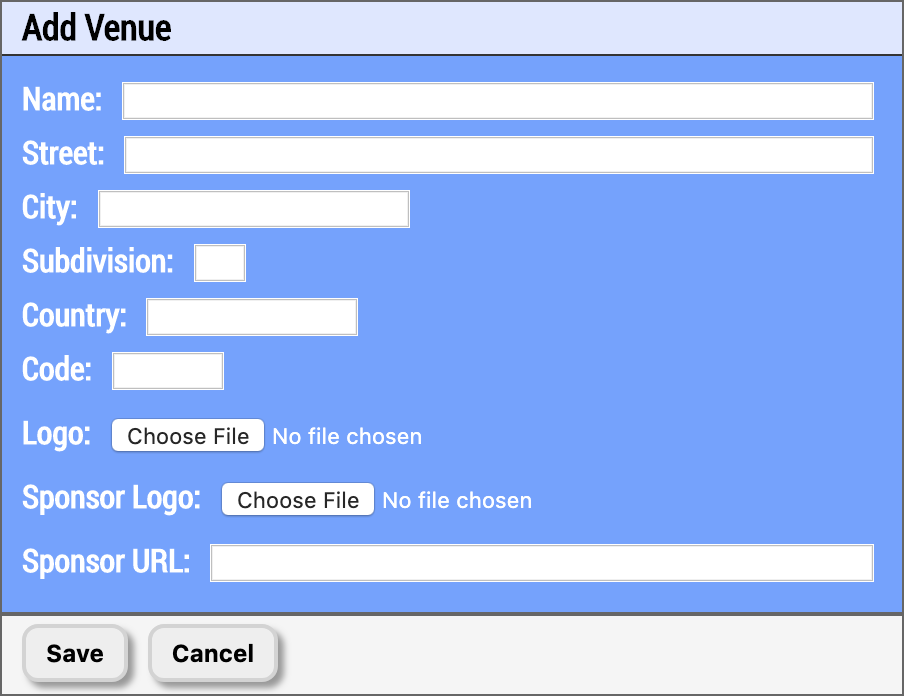
Image 3.2.1 - Add Venue - Venue Parameters
Each of these parameters control how your venue works and how it is presented to your audience. Here is a breakdown of each field and what they do:
- Name - This is the name of your venue (no way!). This is primarily used to identify the venue to you on your venue list and to help Human Input track shows from multiple producers at the same place. Please make sure your spelling is and capitalization is exactly how the venue presents themselves to the public.
- Street - The street address of your venue (ex. 123 Fake St, NE), used to help identify the venue and to aid in future geolocation efforts.
- City - The city your venue resides in. Used to help identify the venue and to aid in future geolocation efforts.
- Subdivision - The state/province your venue resides in. Used to help identify the venue and to aid in future geolocation efforts.
- Country - The country your venue resides in. Used to help identify the venue and to aid in future geolocation efforts.
- Code - This is the code that people will type into their mobile devices to identify the show they are attending, and all shows set to this venue will be forced to use the venue code and any code associated with the specific show will be dismissed. You can set it to whatever you like, a word, a number, a short phrase, etc. So long as it is unique it will work. If you enter a code someone else has used for one of their venues then it will indicate that with red letters that say "taken" when you try to save the venue.
- Logo - A image file that will serve as your logo on mobile devices. This will appear at the top of the user's screen whenever they are logged into a show at the venue.
- Sponsor Logo (optional) - The sponsor logo that will appear at the bottom of the screen on all of your audience member's mobile devices for any shows at this venue. If a sponsor logo is defined for a venue, any sponsor logos you have set for a show at that venue will be overridden. If you have a value defined in "Sponsor URL" below, when an audience member clicks on the sponsor logo they will be taken to the URL you specified.
- Sponsor URL (optional) - The URL of the sponsor for the venue. When a Sponsor Logo is defined above, if an audience member clicks on the sponsor logo on their mobile devices then they will be taken to the Sponsor URL you define here. If a venue has a sponsor URL defined, any sponsor URL you have set for a show at that venue will be overridden.